
.png)




The ability to backup and recover SharePoint permissions helps maintain data security and meet compliance requirements. This article describes how and when Redstor protects SharePoint permissions.
PAGE CONTENTS
How does it work?
From the release of this feature, SharePoint permissions will automatically be protected as part of any new backups of SharePoint data from the RedApp. You will not be able to restore permissions from backups that completed before this date.
Whenever you recover SharePoint data using the RedApp (Overwrite or New site option, not InstantData), you will be asked to select certain restore settings. At this point, you can select to restore permissions (on by default) and/or restore shareable links (off by default). This applies to site recovery as well as and single item recovery. 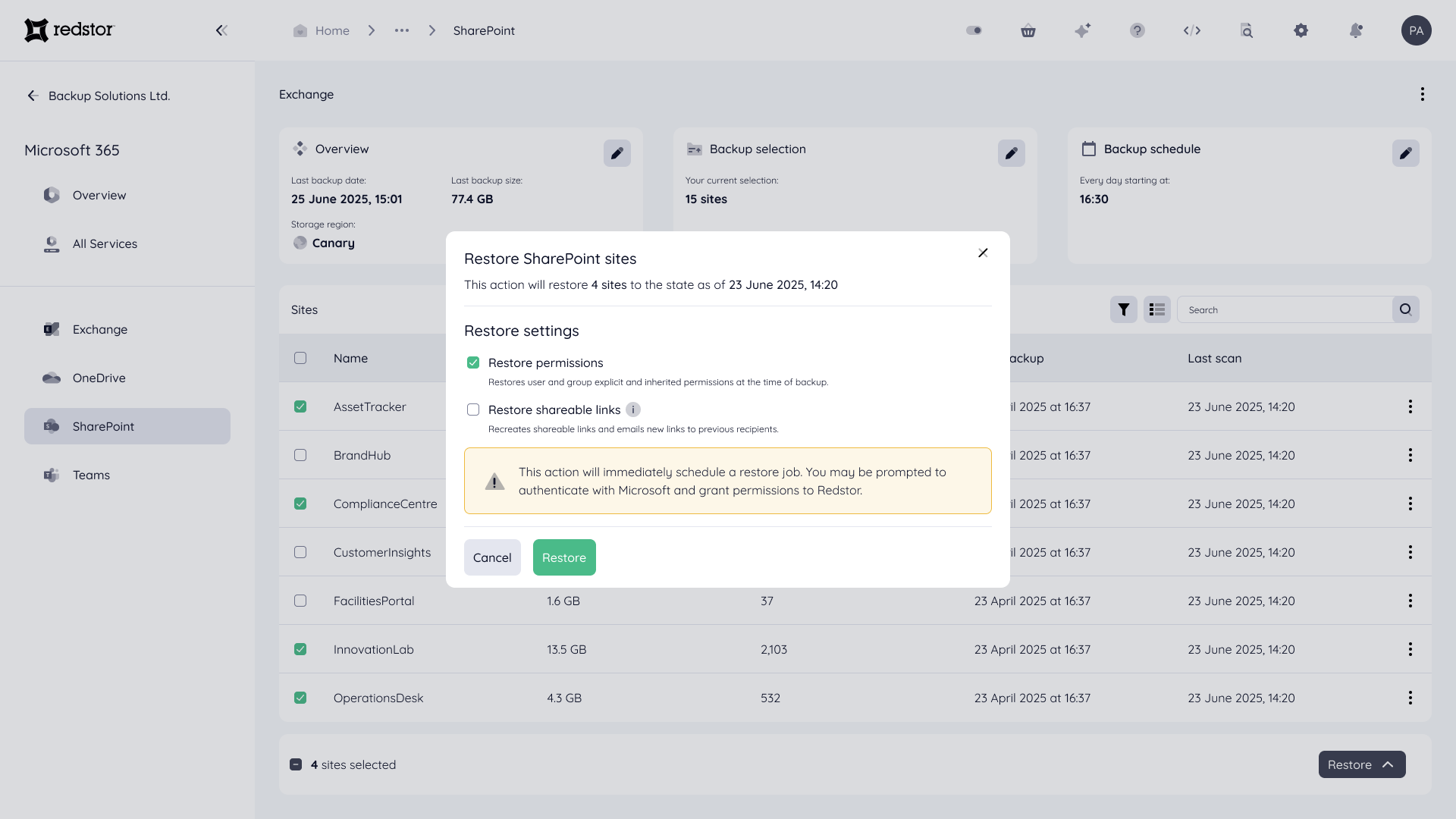
After a permissions recovery completes, the restored permissions may not reflect in the SharePoint admin center immediately. Permissions information is not displayed in the RedApp.
Note:
- To do a first recovery, you need to be both a RedApp company administrator, and a Microsoft 365 global administrator for your tenant organisation.
- To do subsequent recoveries, you need to be a RedApp company administrator and a Microsoft 365 SharePoint administrator.
- Read more about Microsoft's admin roles in this article on their knowledge base.
- Read more about Redstor's SharePoint backup and recovery in Article 1163.
Restoring permissions
The Restore permissions setting includes both inherited permissions and explicit permissions, as well as shareable links. The following definitions apply:
| Shareable link | A link to a specific SharePoint item (file or folder) that grants permissions based on a link scope such as anonymous, organisation (i.e. users within the Microsoft 365 tenant), or specific users. |
| Inherited permissions | Permissions inherited by child SharePoint items from a parent item. |
| Explicit permissions | Unique permissions that have been set for specific users of a SharePoint item by breaking (stopping) inheritance for it. |
Read more about SharePoint permissions on Microsoft's knowledge base here.
Recovery option: Overwrite
When recovering inherited permissions with the Overwrite option, the following logic applies:
| Target item inheritance | Source item inheritance | Expected result |
| Inheritance enabled | Inheritance enabled | Item continues to inherit permissions from its parent. |
| Inheritance disabled | Inheritance disabled | Restore explicit permissions that have been backed up. |
| Inheritance disabled | Inheritance enabled | Enable inheritance on the target to match the source. Log this change. |
| Inheritance enabled | Inheritance disabled | Break inheritance on the target and apply the explicit permissions from the source. |
| Parent has explicit permissions | Inheritance disabled | Maintain broken inheritance. Restore the explicit permissions from the source. |
When recovering explicit permissions with the Overwrite option, any missing or deleted permissions will be restored and existing permissions will be updated. No permissions will be removed from the selected backup in order to preserve access. If this results in unwanted permissions, you can remove them in the SharePoint admin center.
During single item recovery with the Overwrite option, we restore the item's location and its permissions, as well as all parent folders and their respective permissions if they have been deleted. Folder contents are not restored, aside from the item you selected.
Recovery option: New site
When recovering items with inherited permissions using the New site option (recovering to a new SharePoint site within the same Microsoft 365 tenant), we restore each item's permissions, as well as all parent folders of the item's location and their respective permissions.
When recovering items with explicit permissions using the New site option, permissions will be applied as in the selected backup.
During single item recovery using the New site option, we restore the item's location and its permissions, as well as all parent folders and their respective permissions. Folder contents are not restored, aside from the item you selected.
Restoring shareable links
When a shareable link is restored, either with the Overwrite or the New site option, an email notification from Microsoft containing a new link will automatically be sent to all users who had access to the original link. For site recovery, email notifications will be sent for all items in the site with shared links. In these scenarios, you may want to inform users to expect mutiple notifications from Microsoft.
The following rules apply when restoring shareable links:
- For password-protected links, no password will be set on the new link.
- For expired links, no expiry will be set on the new link.
Limitations
The following is excluded from SharePoint permissions protection:
- Restoring of explicit permissions if the users or groups they are granted to do not exist in the target Microsoft 365 tenant (e.g. because they have been deleted or have been recreated with new IDs).
- Note: Restoring permissions does not restore the users or groups they were granted to. Users and groups must be restored from an Entra ID backup or must be newly created via the SharePoint admin center.
- Restoring of SharePoint site-level permissions (e.g. read, contribute, full control, access denied) or of the SharePoint group associated with a site.
- Note: In certain scenarios, recovery of site owners and/or certain site memberships is possible. For more detail on what is supported, see Article 1163.
- Restoring of library-level permissions.
- Restoring of SharePoint app permissions.
- Browsing of permissions associated with a backed-up SharePoint site/item.
- Browsing of permissions associated with a restored SharePoint site/item.
- Restoring of permissions when accessing an item via InstantData.
Due to limitations from Microsoft's side, the following is also excluded from protection:
- Restoring of shareable links to a SharePoint item of scope: anonymous or scope: organisation, including existing access (e.g. single-use links sent to anyone with explicit or inherited permissions).
- Restoring of embedded links to a SharePoint item.
As per standard SharePoint behaviour, removing or updating a user's explicit permssions does not affect or remove their access via shareable links. For more detail about updating permissions on a shared file, see this article on Microsoft's knowledge base.
 1.png)